View Environmental Sensor Data
You can view data from environmental sensors connected to your X-Guardian system. This is useful for monitoring air quality, temperature, humidity, or other metrics in real time or reviewing historical readings.
To View Environmental Sensor Data
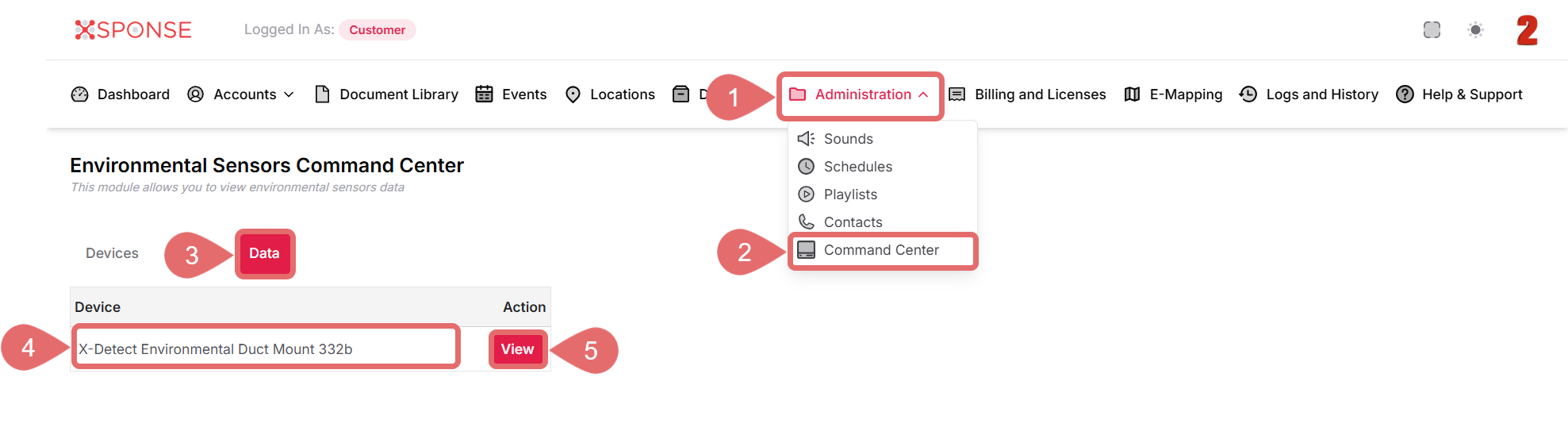
- Go to Administration in the main menu.
- Select Command Center from the dropdown.
- In the Environmental Sensors Command Center, click the Data tab.
- Find the device you want to inspect in the list.
- Click the View button in the Action column.
The system will display data collected from that device, such as environmental conditions and sensor readings over time.
View Only
This module is read-only. You can review data but not modify or interact with the devices from this view.
See Also
To complement your knowledge of this process, check the following pages: